Description
The backend server of this project.
Usage
Deploy
Automate by GitHub action
The solution in this part we use GitHub OIDC provider and Google Cloud IAM Workload Identity Federation.
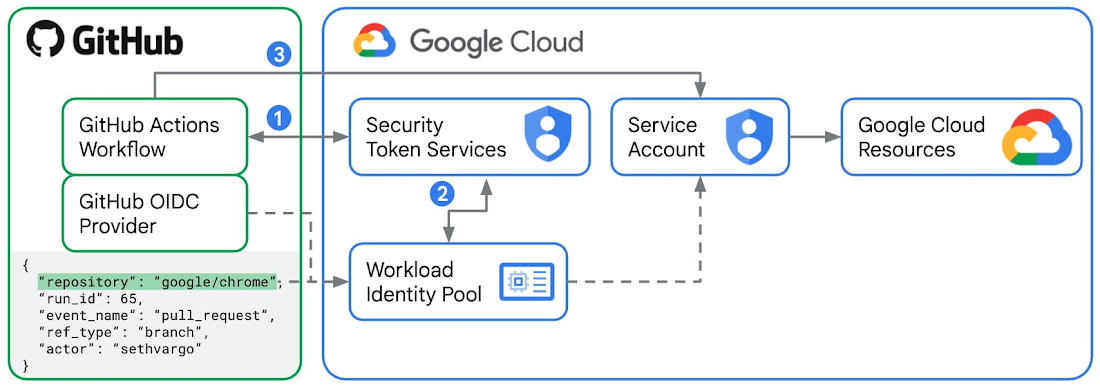
procedure
-
Create a service account at IAM Service accounts.
-
Grant roles at IAM, who gives permission for access project resources (Remember enable APIs when grant roles):
- App Engine Admin
- Cloud Build Editor
-
Cloud Scheduler Admin(Optional)
- Service Account User
- Storage Admin
-
...(Could just set rule to owner for development)
- Create a pool at Workload Identity Pools
-
Create a provider at Workload Identity Pools add issuer: https://token.actions.githubusercontent.com and binding attribute mapping.
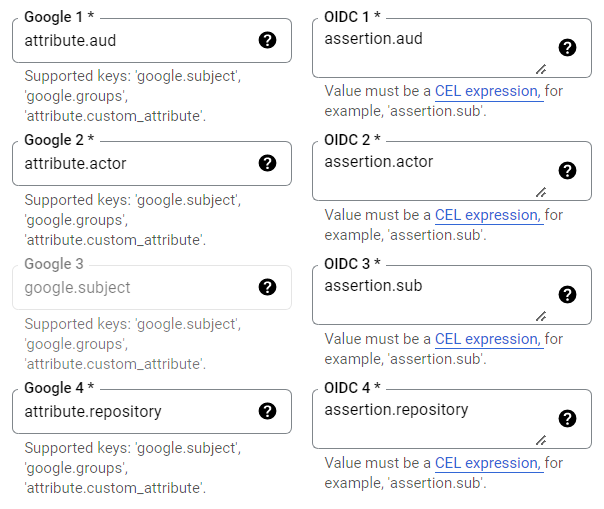
-
Create GitHub action:
jobs:
  deploy:

    runs-on: ubuntu-latest

    permissions:
      contents: 'read'
      id-token: 'write'

    steps:
    - uses: 'actions/checkout@v3'

    - id: 'auth'
      name: 'Authenticate to Google Cloud'
      uses: 'google-github-actions/auth@v1'
      with:
        workload_identity_provider: '${{ secrets.GCP_WORKLOAD_IDENTITY_PROVIDER }}'
        service_account: '${{ secrets.GCP_SERVICE_ACCOUNT }}'

    - id: 'deploy'
      name: 'Deploy code to App Engine'
      uses: 'google-github-actions/deploy-appengine@v1'
- Binding auth secrets (data from Setting & Workload Identity Pools & Account Detail -> key):
Serving
Database configuration in Google Cloud
Enable app engine require config file app.yaml.
- name: 'Create config file'
  run: |
    cat >> app.yaml <<EOL
    runtime: nodejs18
    instance_class: F4
    automatic_scaling:
      max_instances: 1
      target_cpu_utilization: 0.8
      min_pending_latency: 900ms
      max_concurrent_requests: 50
    service: ${{ matrix.service }}
    entrypoint: ${{ matrix.entrypoint }}
    env_variables:
      DATABASE_SOCKET_PATH: /cloudsql/${{ secrets.DATABASE_CONNECTION_NAME }}
      DATABASE_PASSWORD: ${{ secrets.DATABASE_PASSWORD }}
      SERVER_HOST: 0.0.0.0
      DEBUG: '*,-sequelize:*,-koa:*,-express:*'
    EOL
DATABASE_CONNECTION_NAME could find from SQL
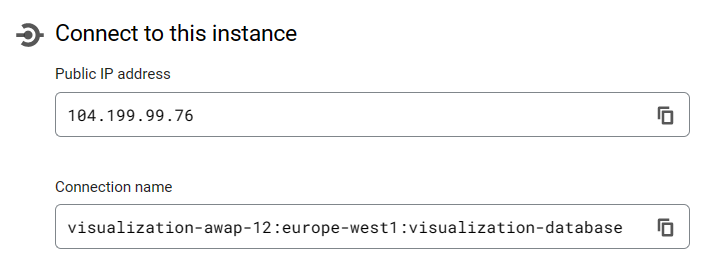
DATABASE_PASSWORD is your Google SQL database password when you create the database.